TOne Home
News
Movie News
Videos
Radio
Telugu Movies
Kidsone
Comedy
Shopping
Bhakti
Greetings
NRI Corner
Romance
Charity
More...
Home
|
TeluguOne Help
»
Fonts Help
»
FAQ's
»
Contact Info
»
Cancel Subscription
»
Customer Care
»
Watch on TV
Untitled Document
.Content { background-color:#006699; font-size:12px; font-family:Arial, Helvetica, sans-serif; } .Table { border:groove; border-bottom-color:#9BEAF0; } .Text10px { font-family:Arial, Helvetica, sans-serif; font-weight:bold; font-size:10px; color: #FFFFFF; line-height: 22px; }
Font help for teluguone.com
HOW TO CORRECT SETTINGS IN INTERNET EXPLORER
If you are using IE 4, click on View and then Click on Internet Options.
If you are using IE 5.0, click on Tools and then Click on Internet Options.
Click on Security button.
Click on Custom level
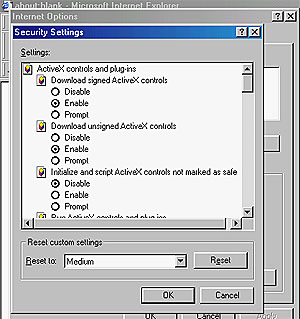
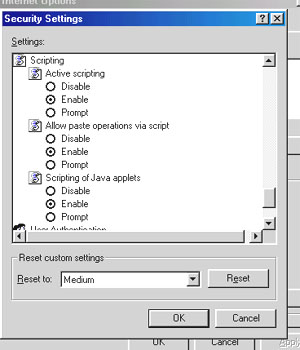
You will now see a screen which has several commands giving multiple options. Please click in the appropriate boxes to enable the following commands:
ActiveX controls and plug-ins:
"Enable"
Script ActiveX controls marked safe:
"Enable"
Downloads --> File download:
"Enable"
Java permission:
"Medium safety"
Access data sources across domains:
"Enable"
Submit nonencrypted form data:
"Enable"
Scripting by Java applets:
"Enable"
After you have carried out the above mentioned changes, Click on Advanced
Enable the following commands by clicking on the check boxes:
Java console:
"Enable"
Java JIT compiler:
"Enable"
Java logging:
"Enable"
If you do not have the latest Internet Explorer browser, you can
download
it from here.
FONT HELP
Instructions page
How to download true type fonts
How to correct appearance in Netscape Navigator
Frequently asked questions